-1.png?width=200&height=38&name=Untitled%20design%20(14)-1.png)
Billing accounts must be created and linked to a payment method before they can be used during campaign publishing.
Billing Types
Office Billing
Campaign charges are billed to the office account.
Agent Billing
Campaign charges are billed directly to an individual agent.
If an office wants agents to manage and pay for their own campaigns separately, each agent requires their own billing account.
Creating a Billing Account
To create a billing account:
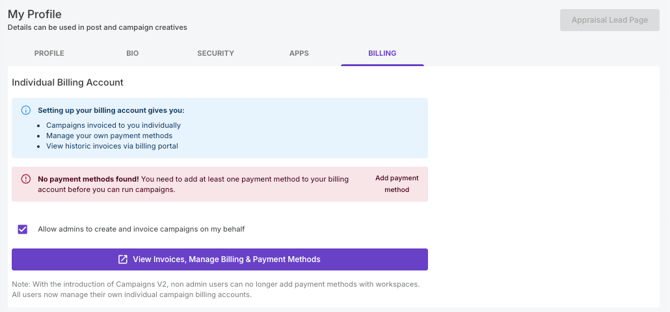
- Navigate to Account
- Select Billing
- Add a payment method
- Continue to Stripe
- Save the billing account
Important
- Each agent who will pay for campaigns individually requires their own billing account
- A payment method must be attached before the account can be used for campaign publishing
- Payment methods displayed during campaign setup are pulled from existing billing accounts
- If a billing account is not configured, campaigns may fail during checkout without displaying a clear error message
Setting Up Agent Billing
After the billing account has been created, additional settings can be configured for agent-paid campaigns.
Allowing admins to create campaigns on behalf of agents
If office administrators need to create campaigns while charging them to the agent's payment method, the agent must enable:
✅ Allow admins to create and invoice campaigns on my behalf
When enabled:
- Office admins can create campaigns using the agent's billing account
- Charges are still applied directly to the agent's payment method
When disabled:
- Admins cannot create campaigns using that billing account
- The billing option may not appear during campaign creation
Selecting the Billing User during campaign setup
When creating a campaign:
- Navigate to Budget and Schedule
- Locate Billing User
- Select the required agent and payment method
Result
- Campaign charges are billed directly to the selected agent
- Workspace admin invoices will not include those campaigns
Common Confusion
Admin cannot see campaign invoices
Once agent billing is configured:
- Admin invoices will not include campaigns billed directly to agents
- Campaign invoices are tied to the billing account selected during campaign creation
Wrong person is being charged
If a customer reports incorrect billing, verify:
- Whether the campaign was created using Campaign V1, where agent billing is unavailable
- Whether the correct Billing User was selected during campaign setup
Admin cannot select an agent's payment method
Check:
- The agent has enabled Allow admins to create and invoice campaigns on my behalf
- The agent has an active billing account with a payment method attached