-1.png?width=200&height=38&name=Untitled%20design%20(14)-1.png)
Common Symptoms
You may experience one or more of the following:
-
A newly created Canva template set as a Brand Template cannot be found in Properti
-
Template changes (such as text spacing or layout adjustments) revert to an older version
-
Properti previews show a different template name (e.g. “Copy of [Brand Name]”)
-
Canva thumbnails in Properti do not update after making changes
Why This Happens
Each Canva design is treated as a separate Brand Template, even if they look similar or were duplicated from the same original file.
Properti pulls:
-
The template thumbnail
-
The layout preview
Directly from Canva. If a template has not been correctly republished as a Brand Template, Properti will continue to display the previous published version.
How to Fix the Issue
Follow the steps below for each affected template:
Step 1: Open the Correct Template in Canva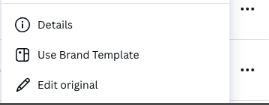
-
Locate the exact Brand Template in Canva (not a copy)
-
Open the design and select Edit original
Step 2: Make Your Changes
-
Update spacing, text positioning, or layout as required
Step 3: Republish the Brand Template
-
Click Republish with changes
-
Ensure the template is saved as a Brand Template, not just a standard Canva design
⚠️ Important: Simply saving the design is not enough — it must be republished as a Brand Template.
Step 4: Refresh Properti
-
Refresh or reload Properti
-
Updated thumbnails and previews should appear within 60 seconds
Important Notes
-
Each size or variation (e.g. 1080 × 1350, 1080 × 1080) must be edited and republished individually
-
Canva controls the thumbnails shown in Properti
-
If the preview hasn’t updated after a few minutes, the template was likely not republished correctly
Still Not Updating?
If you’ve followed the steps above and the template is still not updating:
-
Double-check you’re editing the original Brand Template (not a copy)
-
Confirm the template shows as Published in Canva
-
Contact the Properti Support Team with the template name(s) affected so we can investigate further