-1.png?width=200&height=38&name=Untitled%20design%20(14)-1.png)
How to Set Up the Integration
To connect your PropertyMe account with Properti.AI, the integration needs to be activated from within the PropertyMe platform.
Follow these steps:
-
Log in to PropertyMe
Access your PropertyMe dashboard using your admin credentials. -
Go to ‘Integrations’ or ‘Portals’
This section is typically found under Settings. Use the search function if needed. -
Check for Properti.AI
Look for Properti.AI in the list of available integration partners. If listed, select it and follow the prompts to activate the feed. -
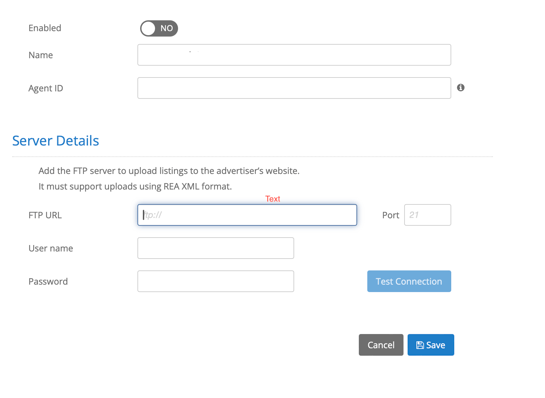
Enter Your Name and Agent ID
Begin by entering your office name and your Properti.AI Agent ID in the appropriate fields. -
Create the Feed and Enter FTP Details
You'll need to enter FTP credentials to complete the feed setup. Properti will provide the following information:-
FTP URL
-
Username
-
Password
Here's what the setup screen looks like:
-
-- If you’re unsure of your Properti Agent ID or haven’t received your FTP credentials, please contact Properti Support for assistance.
Can’t Find Properti in PropertyMe?
If Properti doesn’t appear in your list of integration partners:
-
Double-check in PropertyMe: Navigate to Settings → Integrations or Portals to confirm.
-
Contact PropertyMe Support: Use the help icon within PropertyMe or contact their support team to ask about enabling a feed for Properti.AI.
-
Reach Out to Us: Once PropertyMe confirms the integration is enabled, we can help ensure your feed is correctly linked to your Properti.AI profile.
Troubleshooting & Support
If your listings aren’t appearing in Properti.AI after setup, or if you’re unsure whether the integration is working correctly:
-
Confirm the feed is active in PropertyMe
-
Check that your Properti.AI Agent ID is matched correctly
-
Contact the Properti.AI Support Team for further assistance