-1.png?width=200&height=38&name=Untitled%20design%20(14)-1.png)
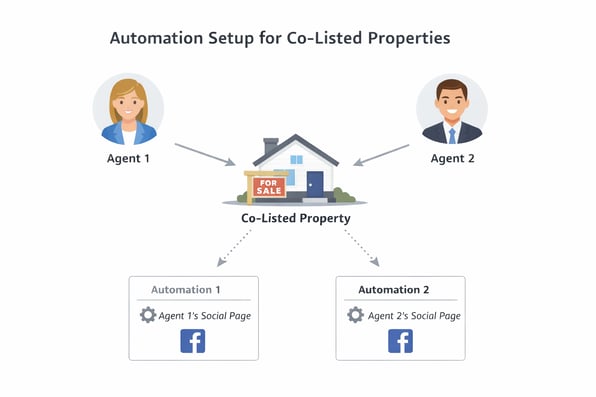
When two agents share a listing (co-listed), automations may only post to one agent’s social page. Users often want posts to appear on both agents’ Facebook pages.
Solution:
-
Separate Properti Accounts:
-
Each agent must have their own Properti user account.
-
Properti does not support mapping a single user to multiple CRM profiles.
-
-
CRM Mapping:
-
Map each Properti user to their corresponding CRM agent in the Team > Agent Mapping section.
-
-
Automation Setup for Co-Listed Properties:
-
Automations will recognise both agents for a co-listed property.
-
However, the automation only posts to the social page linked to that specific automation.
-
To post to both agents’ pages, create two separate automations: one for Agent 1 and one for Agent 2.
-
Notes / Tips:
-
Ensure that both agents’ Properti accounts are correctly mapped in the CRM before setting up automations.
-
Check automation filters to confirm that all relevant listings are included.