-1.png?width=200&height=38&name=Untitled%20design%20(14)-1.png)
Connecting to REX
-
Go to Apps in Properti.AI.
-
Select REX and log in using your REX credentials (email and password).
-
Once authenticated, your Properti.AI account will be connected to REX.
-
After connecting, you can configure:
-
Lead Syncing (enabled by default)
-
Draft and Pre-Market Listings (enabled by default)
-
Lead Management
-
All Properti.AI leads automatically sync into REX.
-
Leads include:
-
Contact details
-
Linked listing or appraisal request
-
Assigned agent
-
-
Leads are tagged with the source Properti for easy CRM tracking.
-
Contacts are created in REX following standard CRM processes.
Syncing Leads from REX
-
Enabled by default: All Properti.AI leads push to REX automatically.
-
Workspace scope: Lead sync is applied per workspace, not per agent.
-
Disabling sync: You can turn it off per workspace if needed.
Troubleshooting Tips:
-
Ensure agent profiles in REX are complete (phone numbers and emails).
-
If leads aren’t appearing, check whether sync is disabled for that workspace.
-
REX does not differentiate ownership if multiple agents share a workspace; leads may appear unassigned.
Audience Building
Use REX data to create custom audiences for Facebook campaigns.
Steps to Build Audiences:
-
Go to Apps > REX > Create Audience in Properti.AI.
-
Name your new audience.
-
Select a saved filter from REX.
Tip for creating saved filters in REX:
-
Go to Contacts in REX.
-
Apply filters (e.g., Smart Categories like “Looking to Buy”).
-
Save and share the filter with your team. Shared filters will appear in Properti.AI.
⚠️ Note: Audiences require sufficient contacts. Filters with very few contacts may not work effectively.
Listing Management
The integration supports syncing special statuses and conditions to enhance property campaign management.
Draft & Pre-Market Listings
-
Use REX tags to push listings into Properti.AI with custom statuses:
-
Draft – appears as draft in Properti.AI
-
Pre-Market – appears as pre-market
-
Automation Examples:
-
Trigger a “Coming Soon” campaign when a property is tagged Pre-Market.
-
Automatically post when a draft listing updates to Pre-Market.
Extra Features Field
-
The Extra Features field in REX (free-text) can be used in automation triggers and creative templates.
-
Filters are case-insensitive.
Example:
-
Filter:
Coming soon-
Will not trigger for: “Big house in rich suburb, come see the pool.”
-
Will trigger for: “Coming Soon: Big house in rich suburb with pool.”
-
-
Flexible usage: keywords like
pool,prestige,renovated, etc. -
Works with triggers such as New Listings, Under Offer, Price Changes, and Sold.
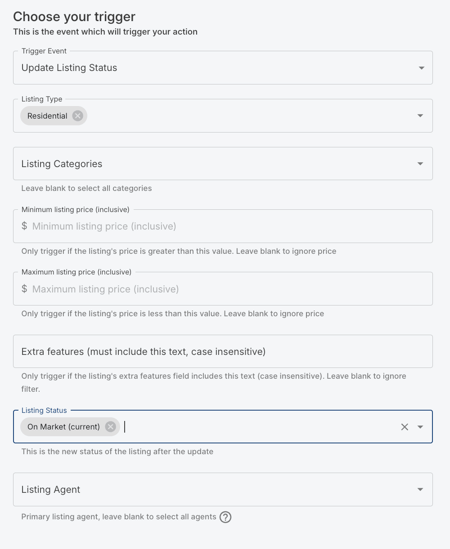
Coming Soon Trigger Setup for REX Users
For REX users managing Pre-Market or Coming Soon listings, the automation trigger is configured as follows:
Screenshot Example:
Summary
With the REX CRM integration, you can:
-
Lead Management: Automatically sync leads with contact and listing details.
-
Audience Building: Create Facebook audiences using REX saved filters.
-
Listing Management: Manage draft and pre-market listings, and apply Extra Features filters for automations.